LeadX suiteMarketing technology / SaaS
Which lead should I call first?
I designed LeadX, a lead-capture suite that grew out of a WordPress form builder. Every enquiry now gets a score, a reason and a next step.
- Sole product designer
- Desktop and mobile
- Forms · Agent · Security
BEFORE AND AFTER
A form builder. That was the whole product.
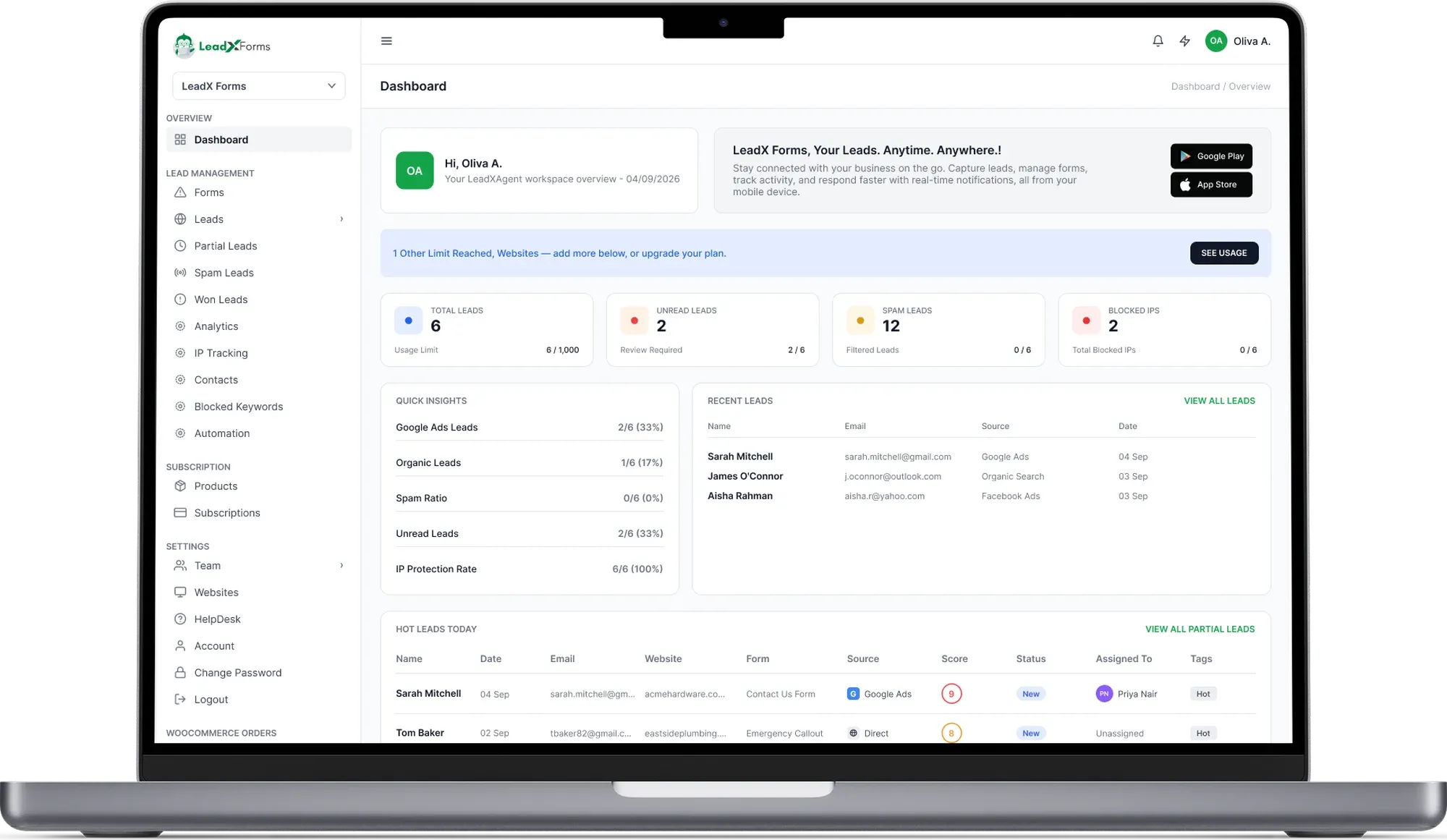
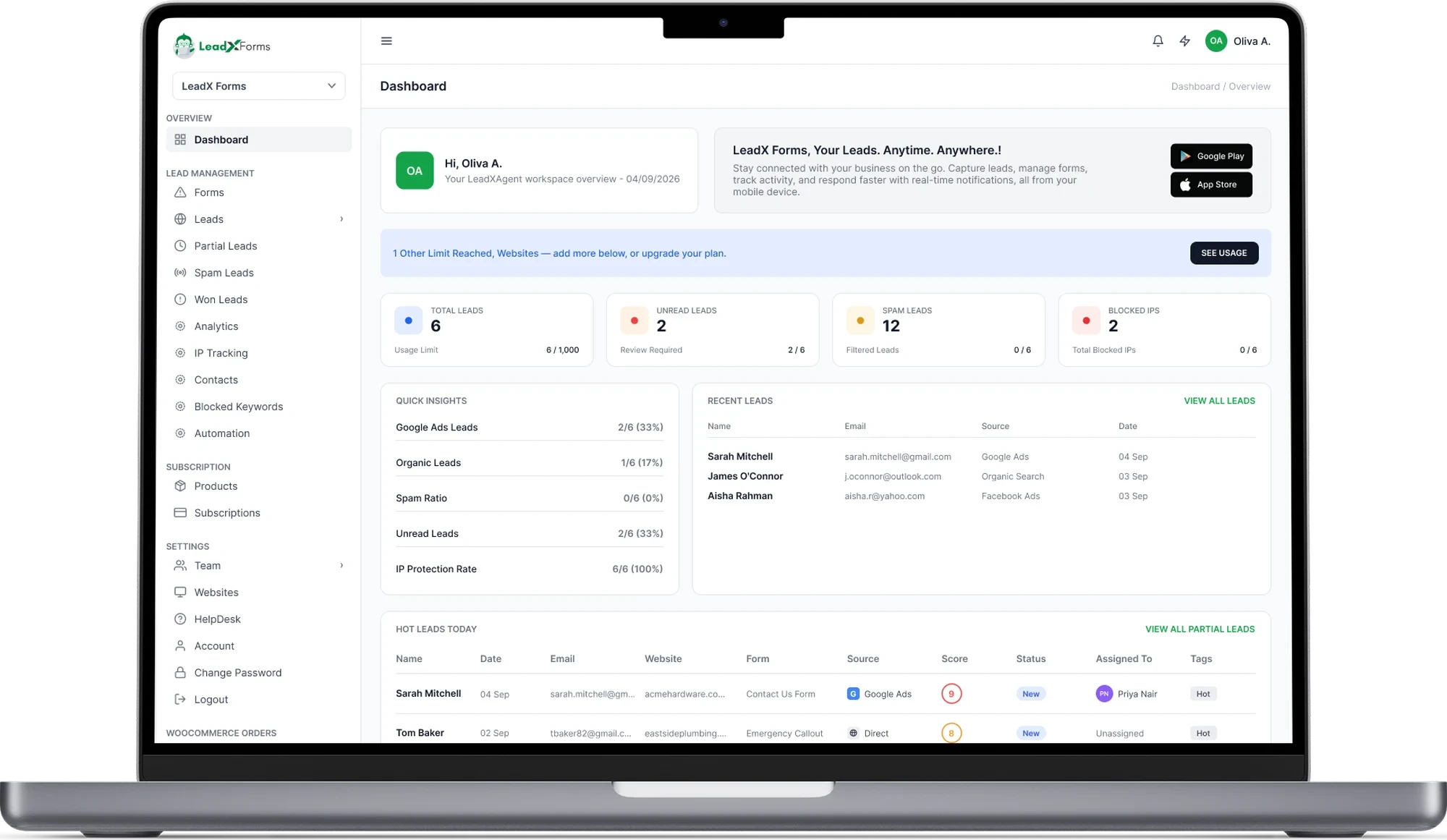
V1.0 was a drag-and-drop form builder inside WordPress. It worked. But once someone filled in a form, the lead landed in an inbox looking like every other lead.
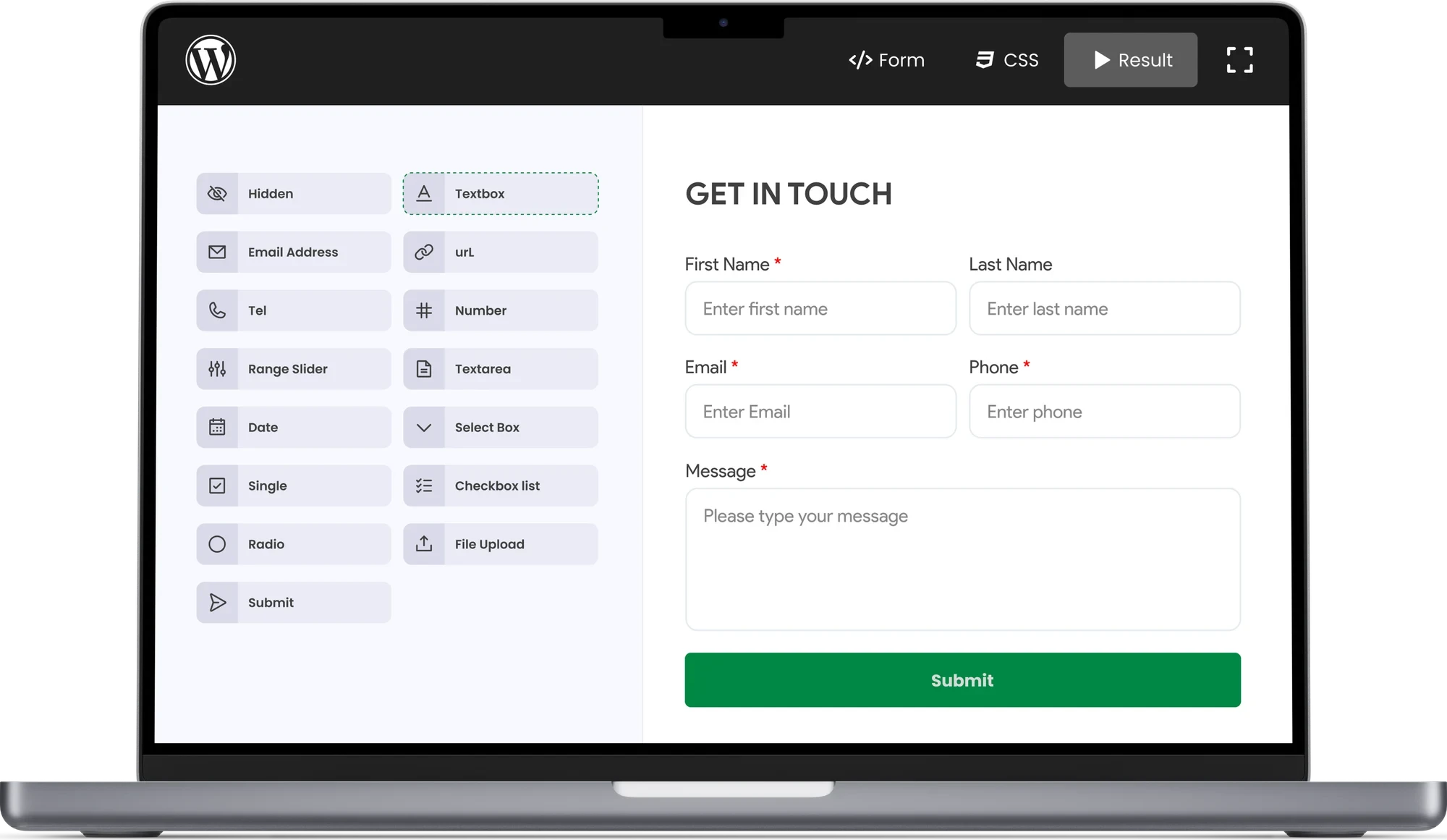
BeforeV1.0 · WordPress form builder
AfterLeadXForms dashboard
Drag the ruler left and right to reveal the before and after.
FOUR PROBLEMS
Four problems, pinned to the wall.
They kept coming up in conversations with clients and in the team's own work. Tap a note to see what it meant.
A WRONG TURN
My first dashboard managed forms. It should manage leads.
Early on, the dashboard was built around forms: create them, see submissions, manage form activity. As the product grew, we saw that this was not the real problem.
First approach
Manage forms.
A central place for forms and what came in.
- Create forms
- View submissions
- Manage form activity
Revised approach
Manage leads.
A place to decide who to follow up first.
- Clear lead statuses
- A score, and why a lead got it
- Spam spotted for you
- Which lead needs attention first
WHAT WENT WRONG
During internal design reviews, we realised the first dashboard focused too much on form management. It did not clearly help businesses identify high-value leads or prioritise follow-ups.
WHY THE CHANGE WAS BETTER
It connected building a form to the real outcome: managing and converting potential customers. LeadXForms could now help a business spot opportunities and choose who to follow up first.
THE SCORE
A score nobody can explain gets ignored.
1A lead arrives with a score
Leads sorted so you know who to call first.
New leads
Sorted by scoreCall Aisha first.
2Every score has a label
Hot, High, Medium, Low, Minimal and Risky.
Trusted visitor with full details
Clean visitor, most details
Unstable, or only partly verified
Weak; missing details or less trusted
Very little to work with
Flagged spam or a blocked IP
3Tap to see why
The real "How your lead score works" modal.
⊘ A lead flagged as spam or coming from a blocked IP is scored 0 / Risky outright — none of the steps below apply to it.
Otherwise, every lead starts at a base score of 3.0. Two independent groups then add points on top:
GROUP 1 — IP TRUST
Exactly one row applies, based on this lead’s IP suspect score.
GROUP 2 — CONTACT INFO
Independent of Group 1 — both rows can apply to the same lead.
Example: trusted IP (+4.0) + valid email (+1.5) + valid phone (+1.5), on top of the base 3.0, = 10.0 → Hot.
Total is always capped at 10, then labeled:A lead starts at 3.0. A trusted IP adds up to 4.0. A valid email adds 1.5. A valid phone adds 1.5. The total stops at 10.
4A person always wins
Spam and blocked IPs are Risky straight away.
These skip the maths. A person's decision always beats the algorithm.
Default threshold is 8.0 (High Risk). At the default, an IP is auto-blocked once its own spam history alone earns it a High Risk score.
HOW A TASK FLOWS
Two tasks, mapped end to end.
Think of each task as a line on a map. The green line is the happy path. Every branch off it ends at a stop where the person can carry on.
FLOW 1
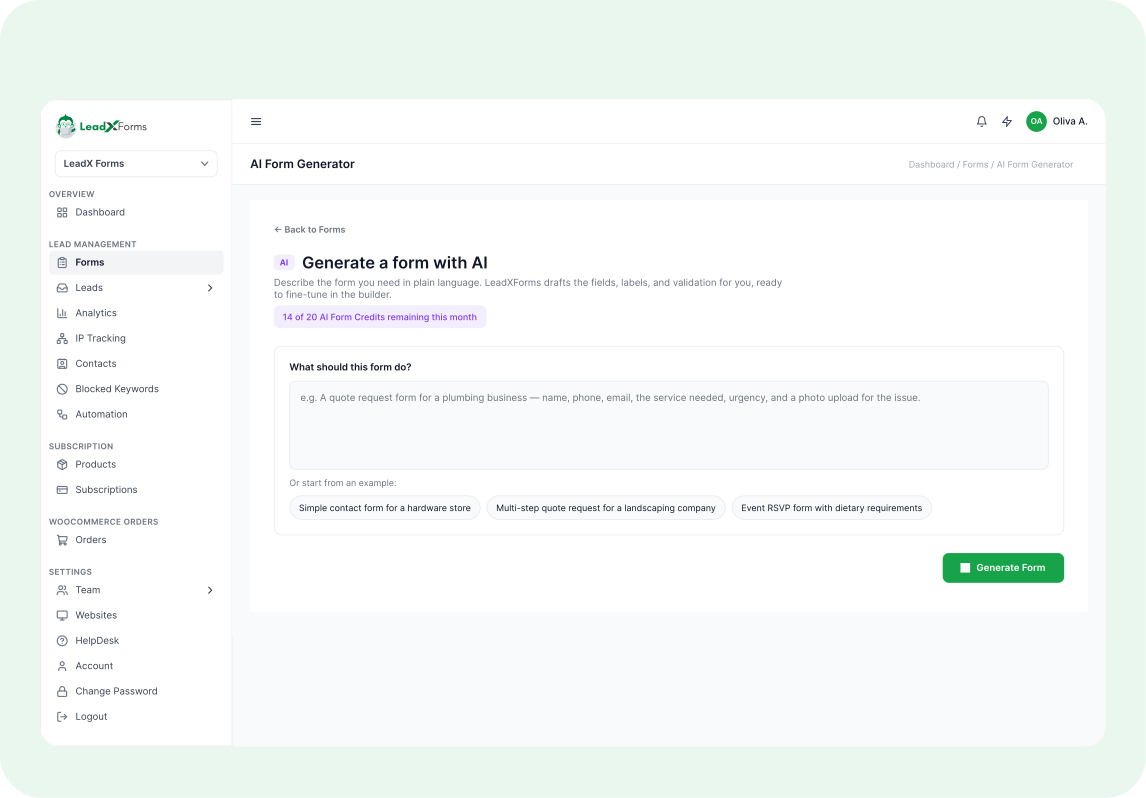
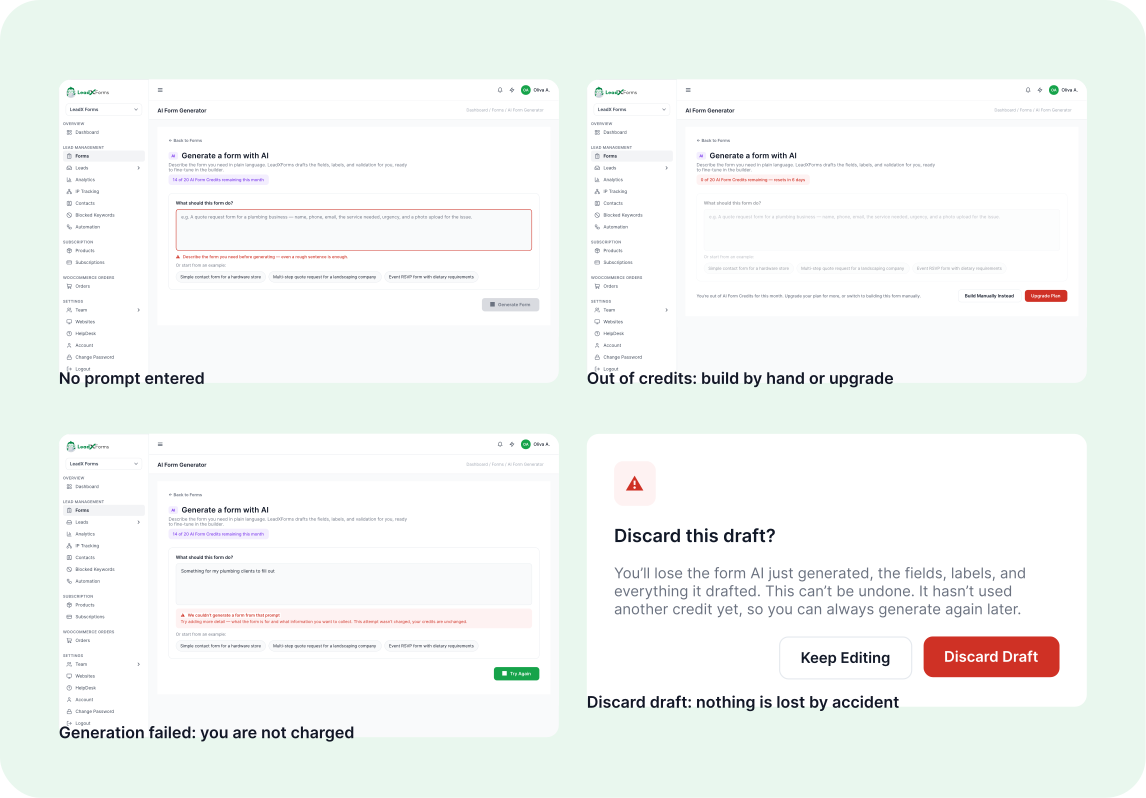
Generate a form with AI
Tap any station to see its screen
- Out of credits
Add New
Add New opens a choice. The person picks Generate with AI or builds by hand.
Tap any station to see its screen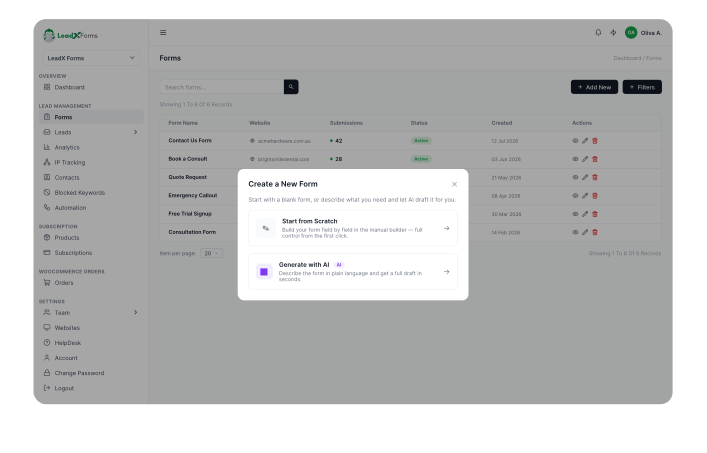
Pick Generate with AI
From the choice modal, the person picks Generate with AI.
Tap any station to see its screen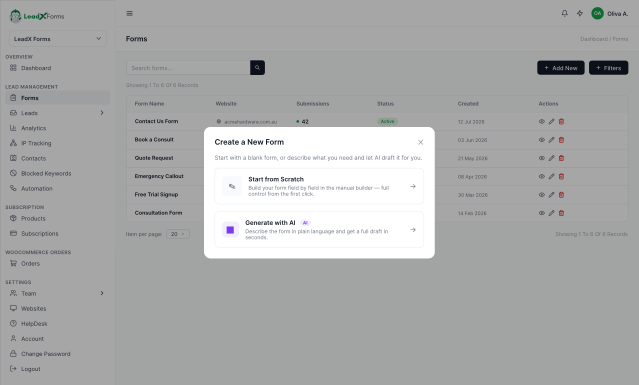
Describe the form
The person types what the form is for. An empty prompt shows an error and nothing is built.
Tap any station to see its screen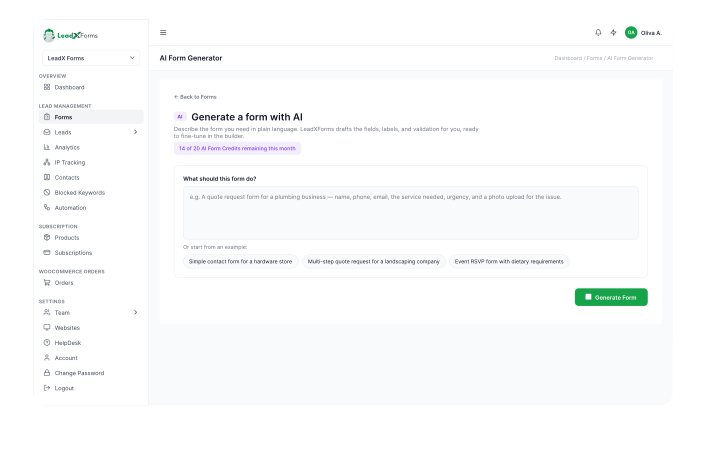
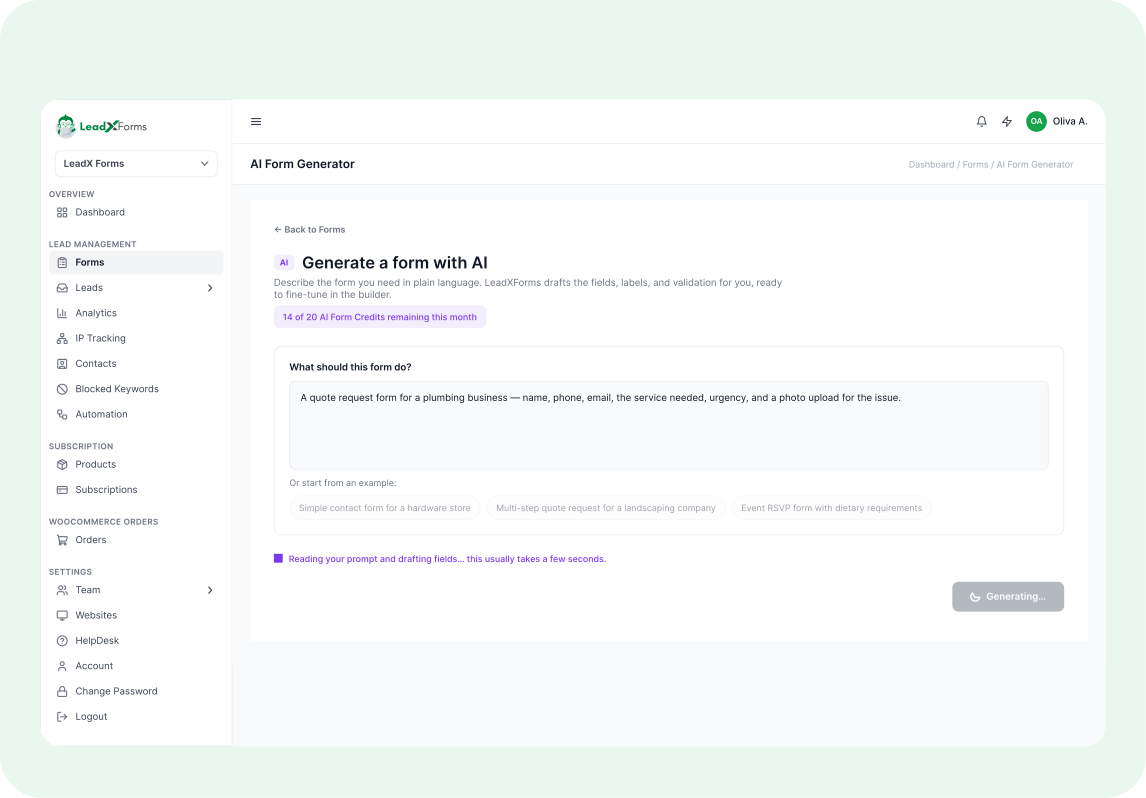
It builds
A short wait while the form builds.
Tap any station to see its screen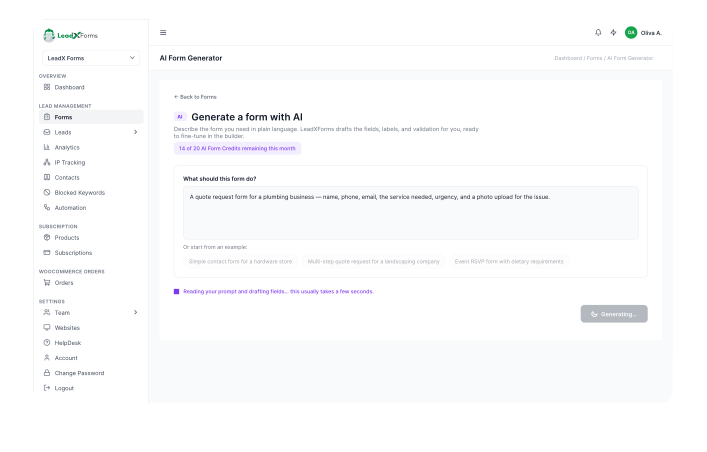
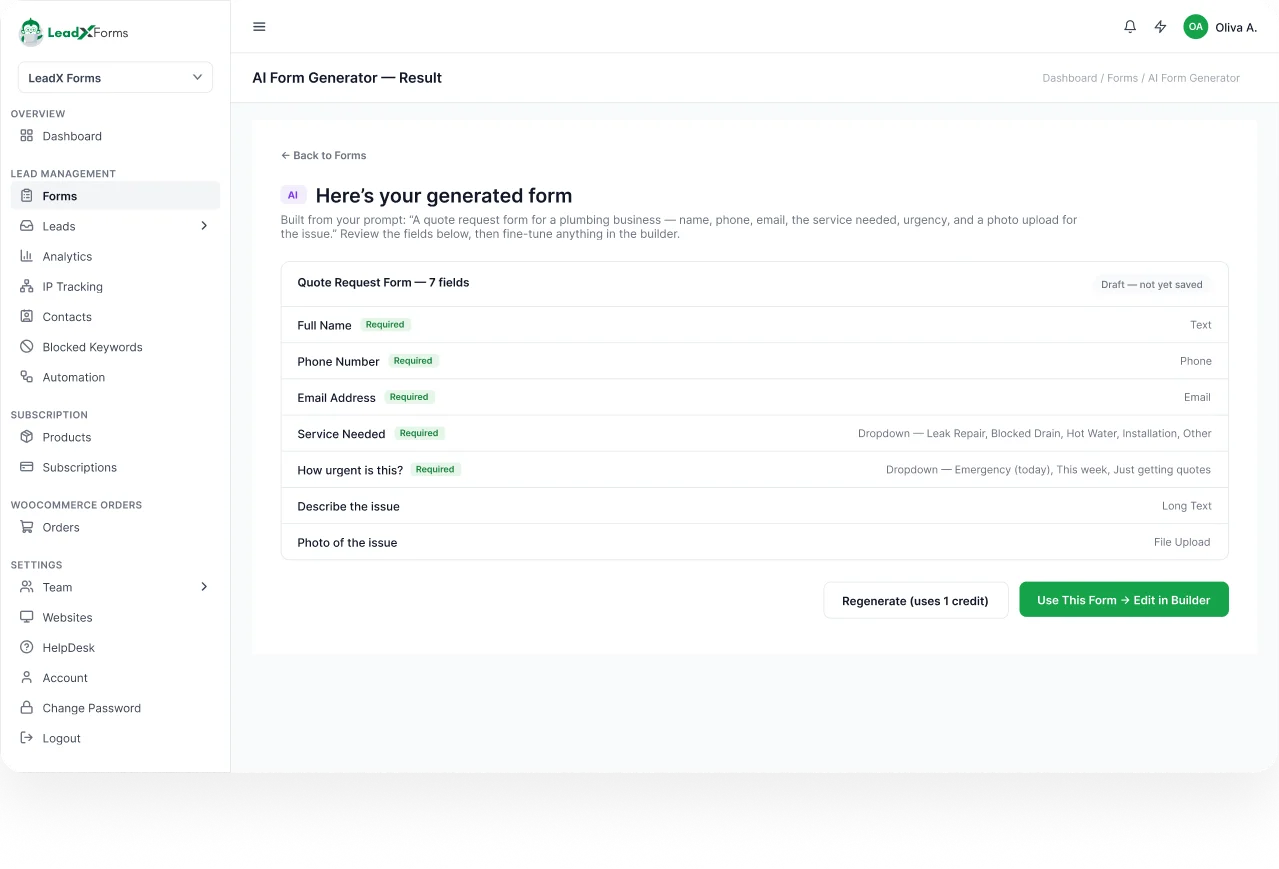
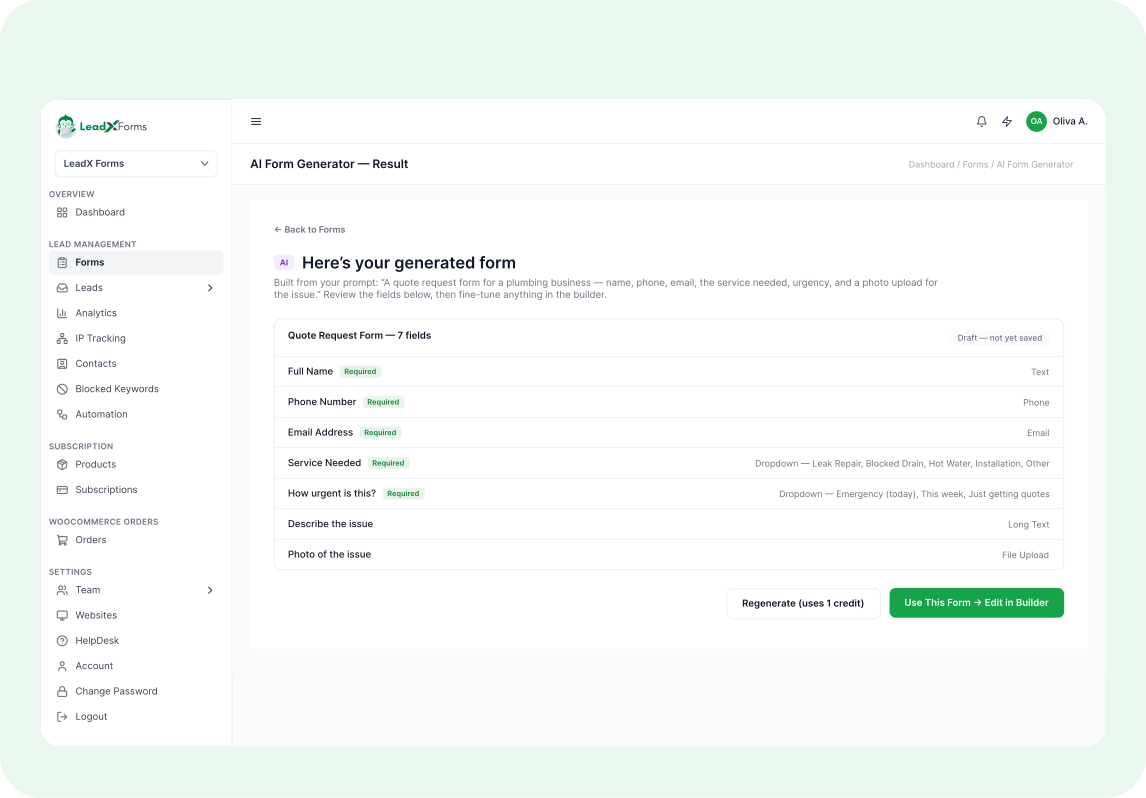
The AI builds a draft. The person reads it, then uses it or discards it. This is the real screen.
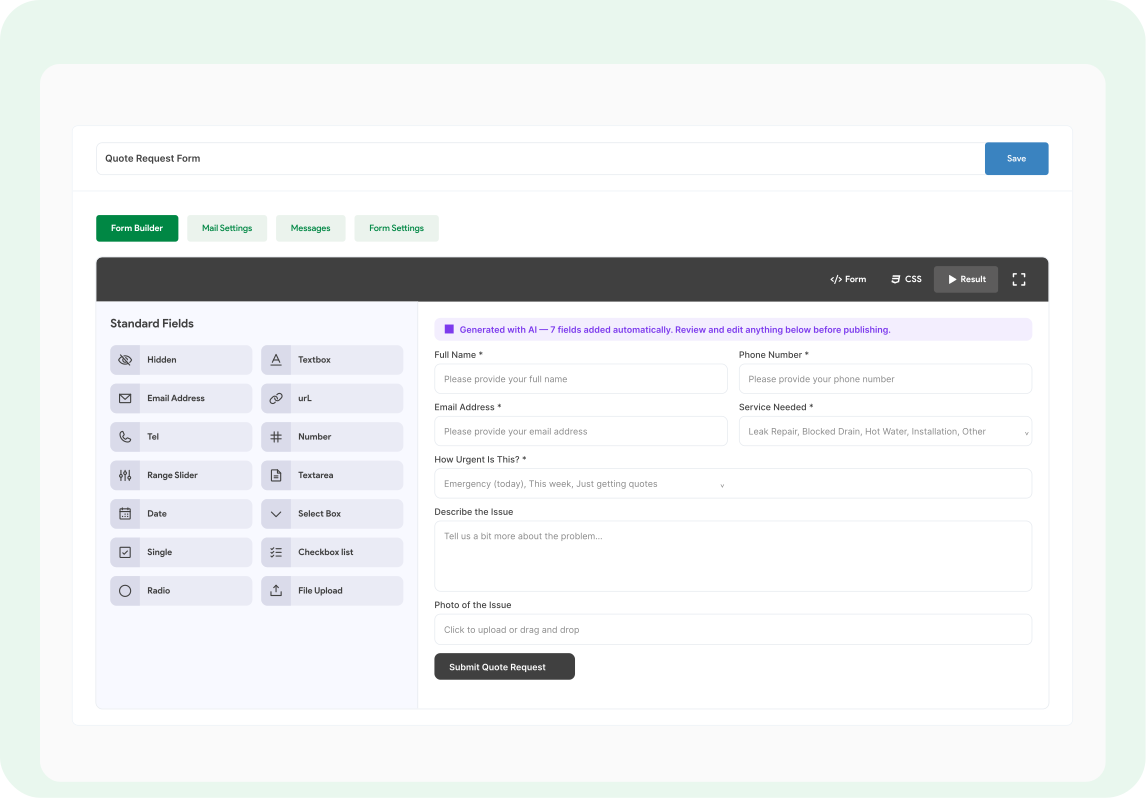
Edit and save
The draft opens in the same builder as a hand-made form. Same fields, same tabs, same Save button.
Tap any station to see its screen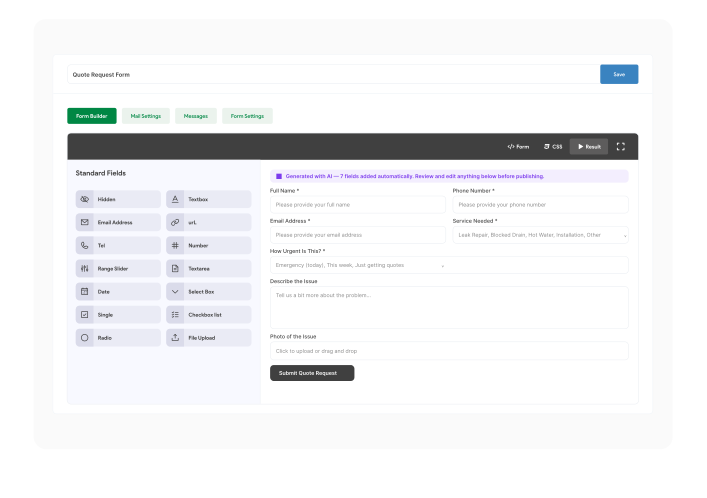
Empty prompt
An error shows. Nothing is built.
Tap any station to see its screen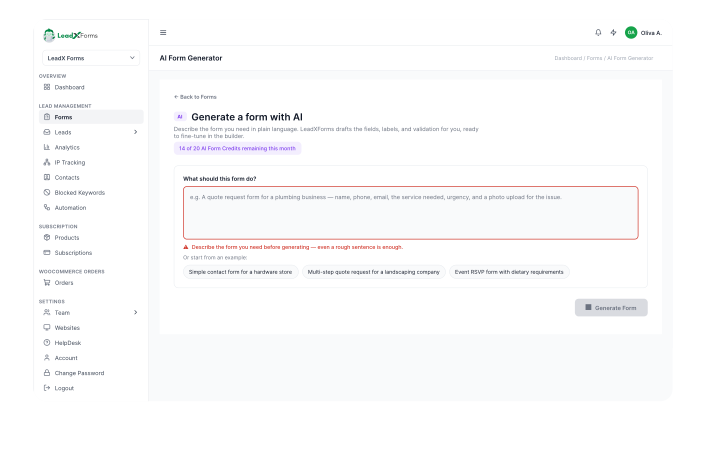
Out of credits
One way out of "out of credits".
Tap any station to see its screen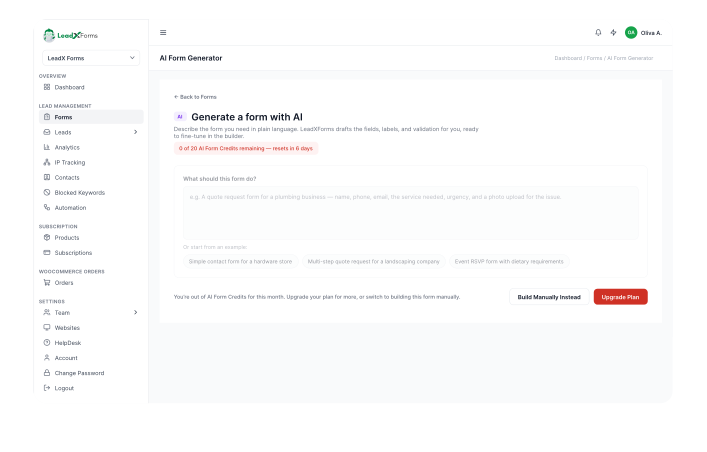
Out of credits
The other way out.
Tap any station to see its screenGeneration failed
The person is told they are not charged.
Tap any station to see its screen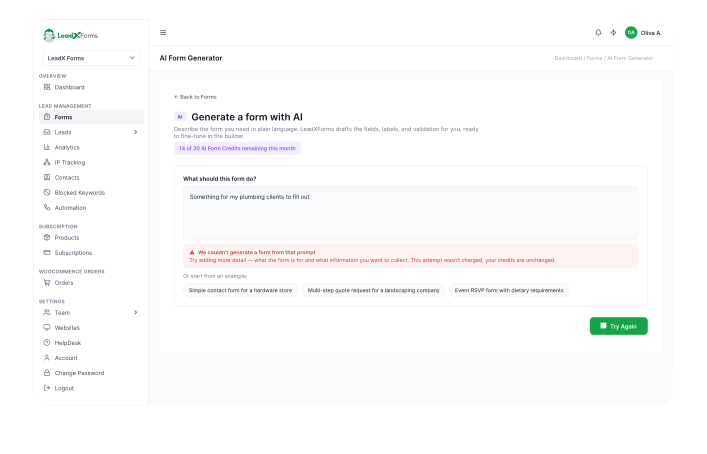
Discard draft
A modal asks first, so nothing is lost by accident.
Tap any station to see its screen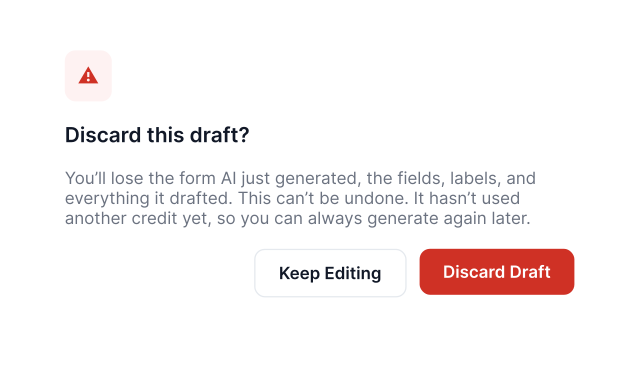
SAFE EXITS: every failure ends at a stop with a way out.
FLOW 2
Triage a new lead
Tap any station to see its screen
The app notifies the person the moment a lead arrives.
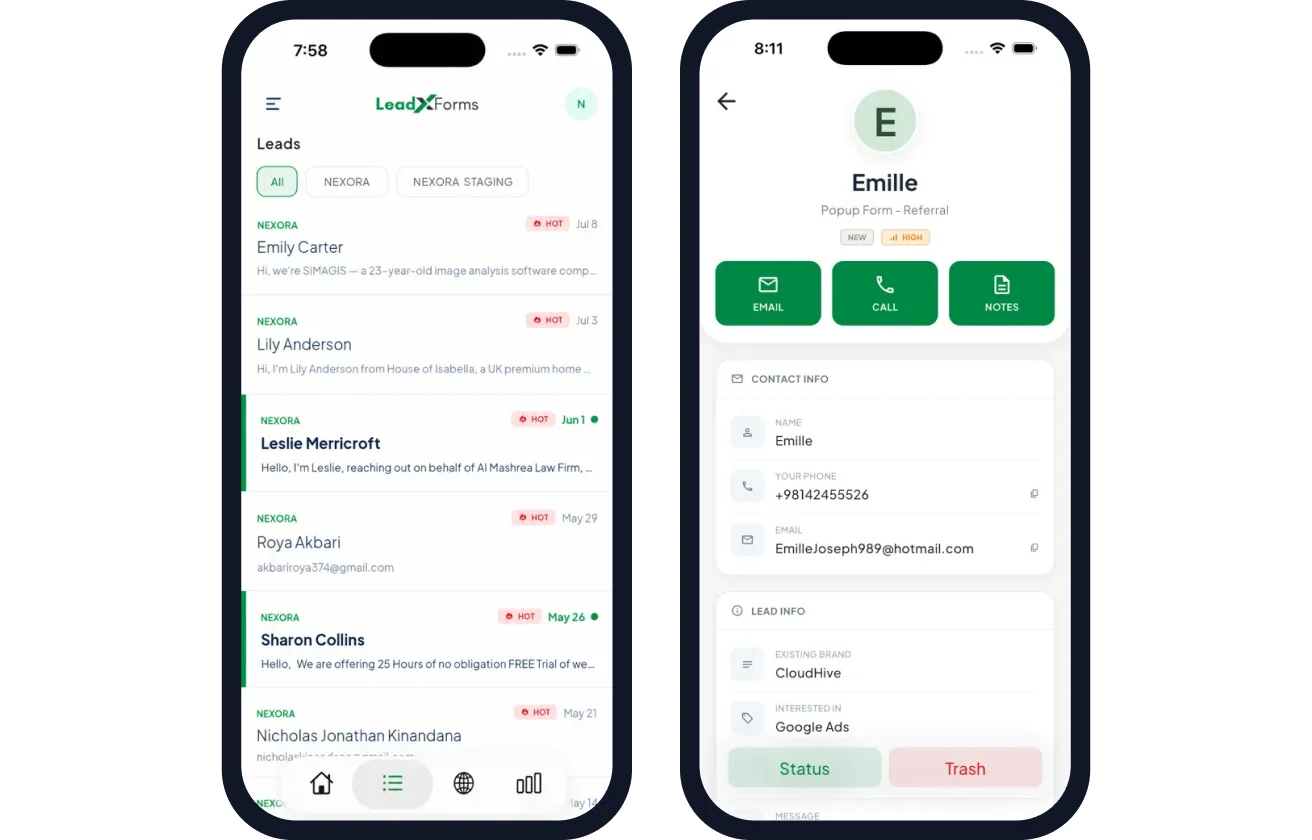
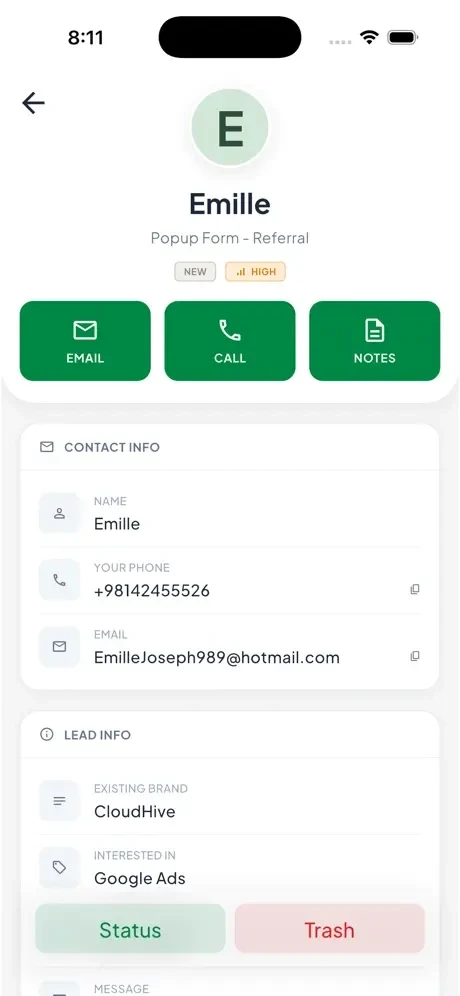
The app notifies the person. They open the lead and can Email, Call or add Notes straight away. These are the real phone screens.
Read the score
The score comes with its reason: IP trust plus lead quality.
Tap any station to see its screen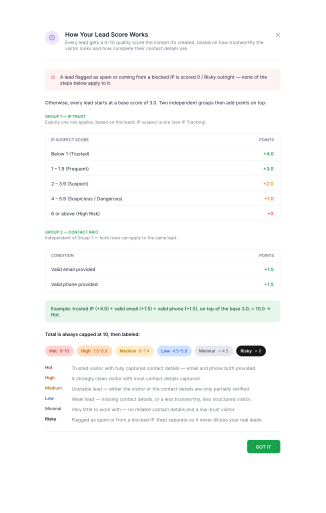
The person decides
The score orders the list. It never decides. The person picks one of four ways it ends.
Tap any station to see its screen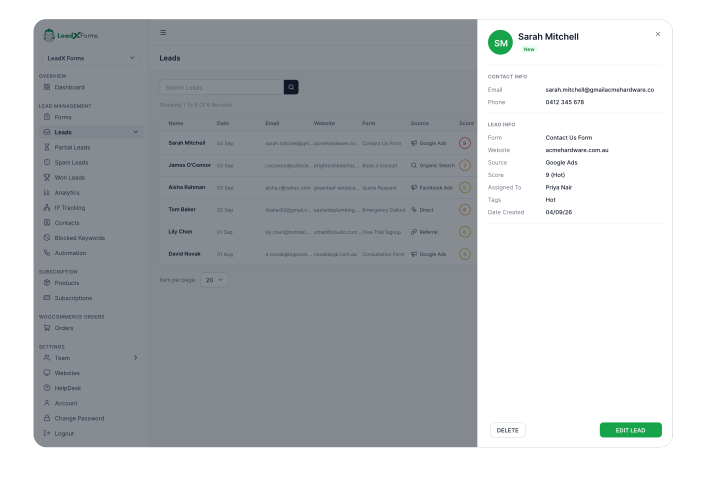
Mark Won
The lead is followed up and marked as won.
Tap any station to see its screen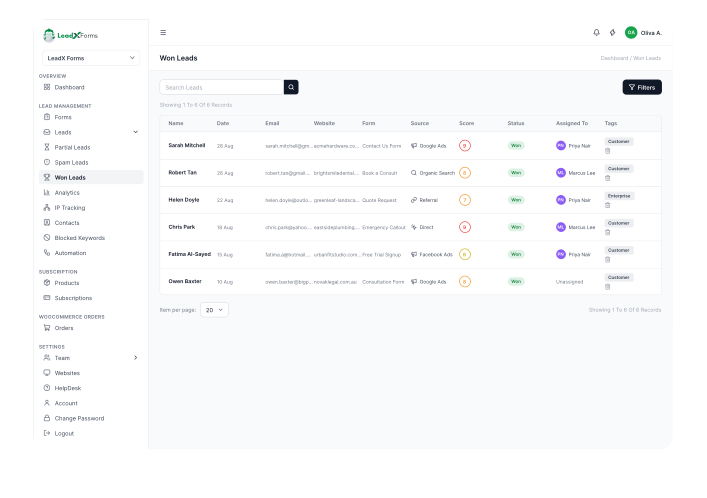
Leave in the pipeline
Follow up later.
Tap any station to see its screen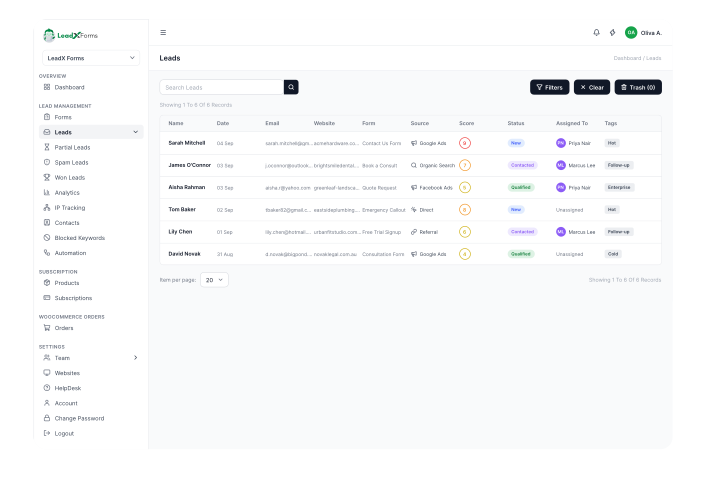
Mark Spam
Spam leads collect here.
Tap any station to see its screen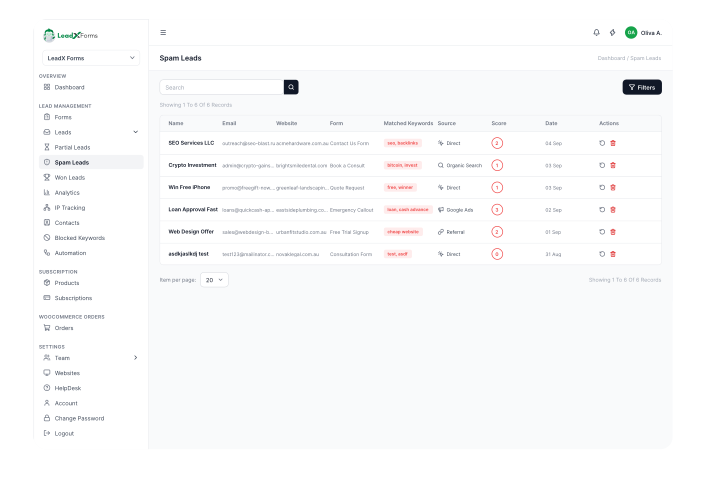
Review the flagged IP
Optionally block the IP.
Tap any station to see its screen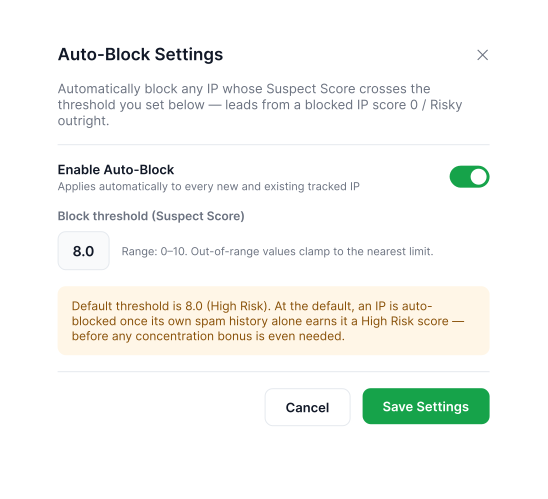
AI FORMS
AI should never make your work harder to edit.
A generated form lands in the same editable builder as a hand-made one. Same fields, same tabs, same Save button. I did not want an AI form that felt like another product.
THE SUITE
One suite. One design system.
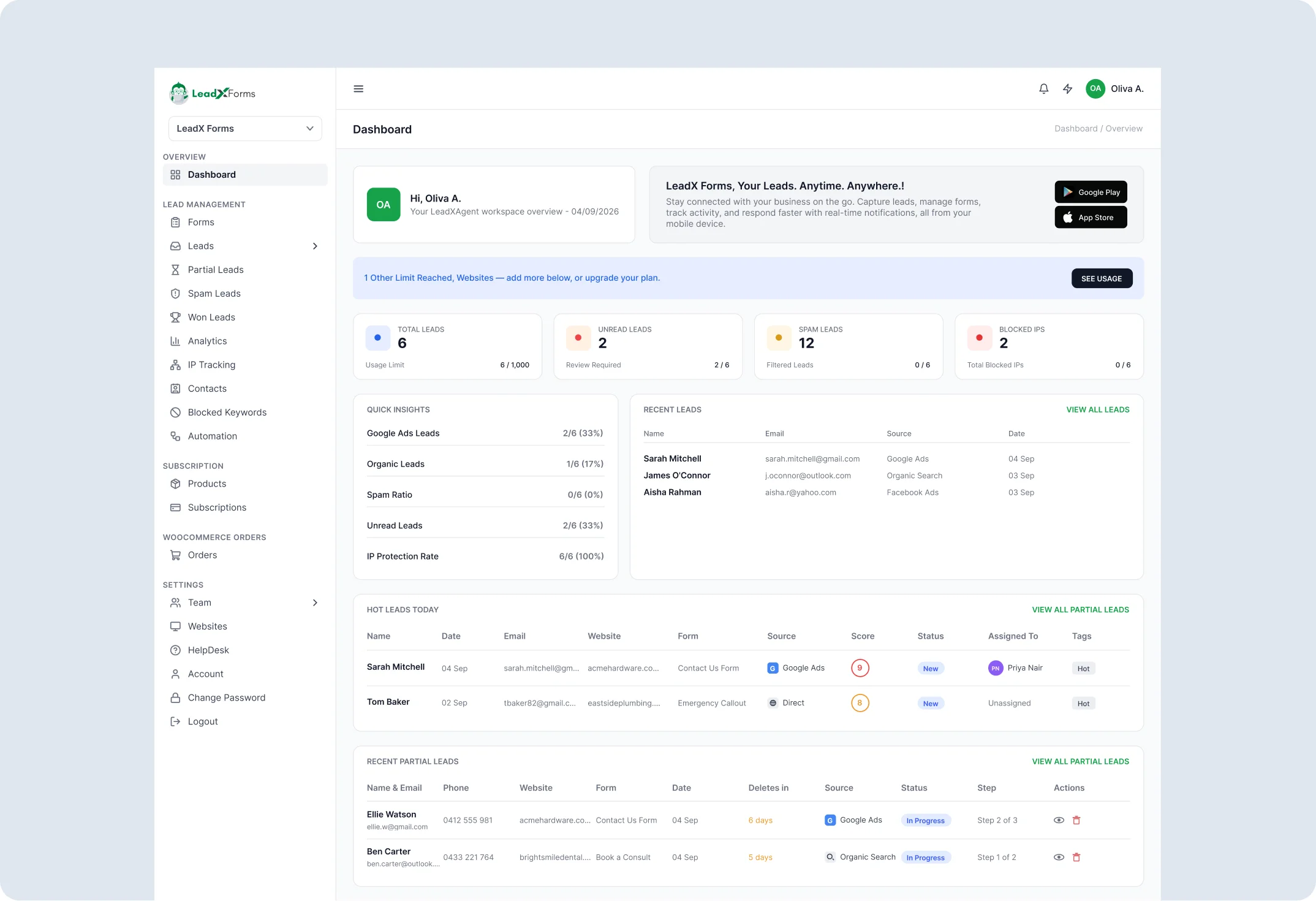
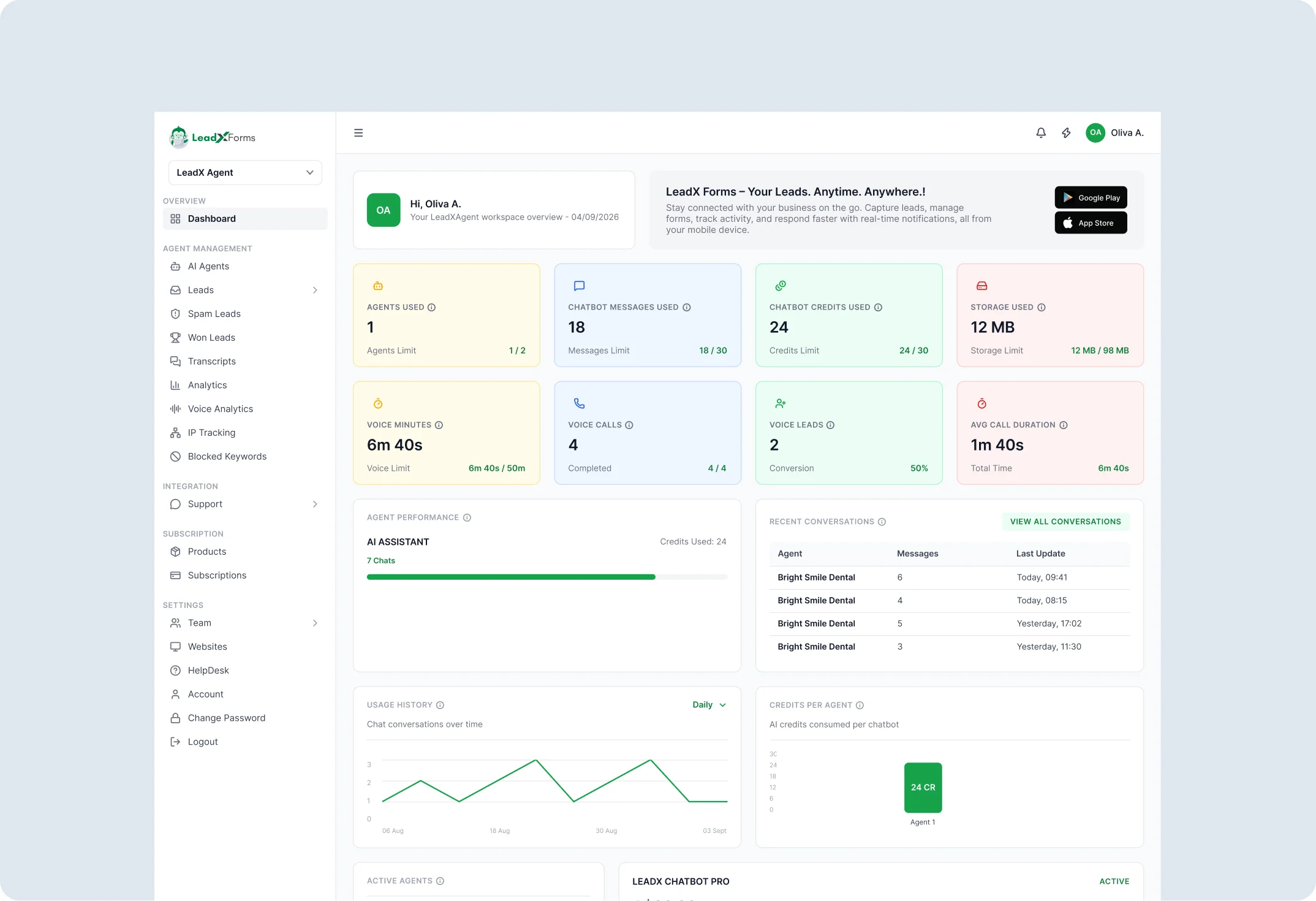
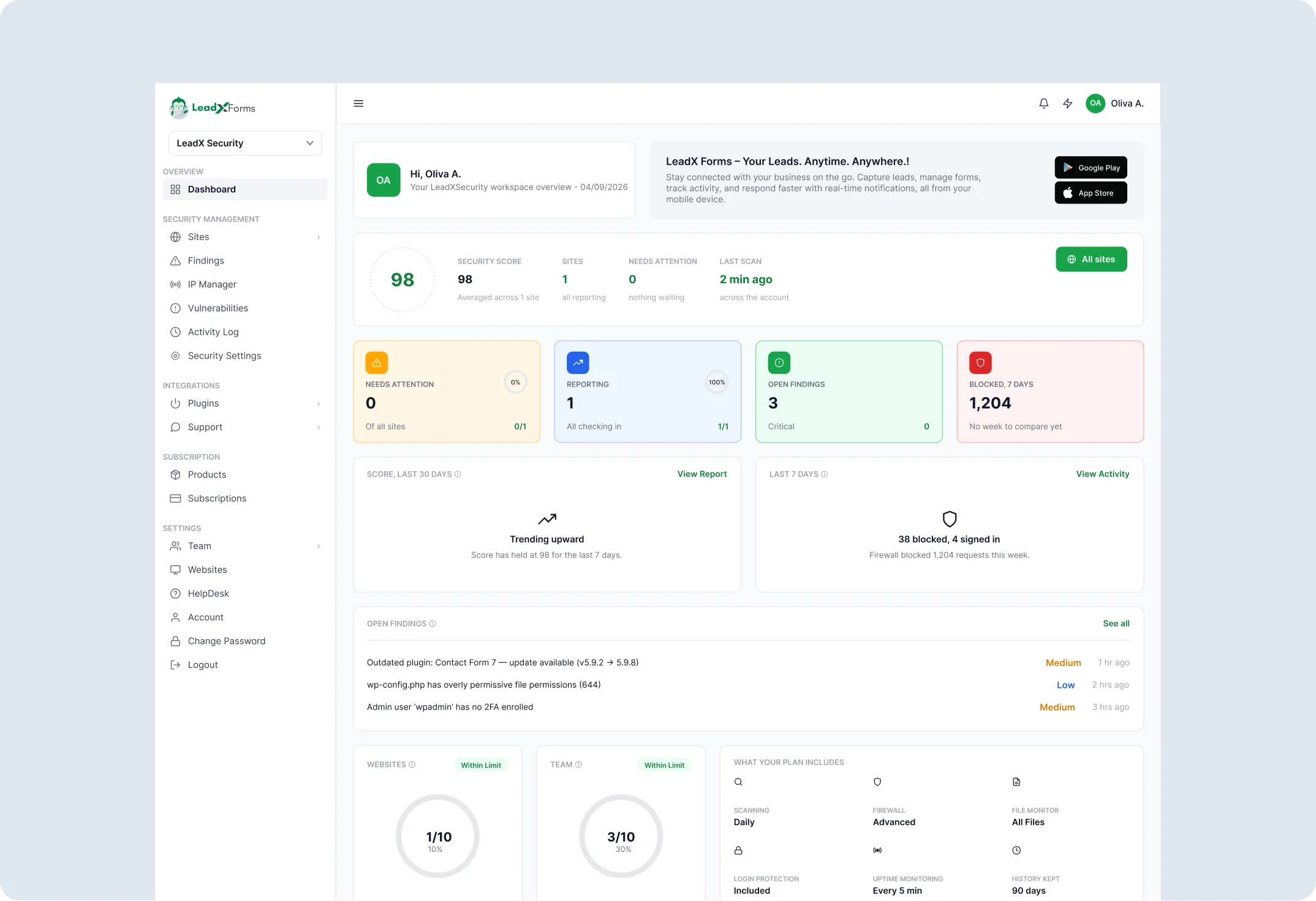
LeadXAgent and LeadXSecurity reuse the sidebar, the lead views, the colours and the modals. A business owner should feel they are in one product.
Build forms, score every lead, manage the pipeline.
A chat on your site that replies while the visitor is still there.
See what is wrong with your site, and what to fix first.
Same bones. A different score.
LeadXForms scores a lead by its IP history. A chat has no IP history. So LeadXAgent got its own score: 0 to 100, built from message engagement, intent signals, contact capture and sentiment.
⊘ A lead flagged as spam or coming from a blocked IP is scored 0 / Risky outright — none of the steps below apply to it.
Otherwise, every lead starts at a base score of 3.0. Two independent groups then add points on top:
GROUP 1 — IP TRUST
Exactly one row applies, based on this lead’s IP suspect score (see IP Tracking).
GROUP 2 — CONTACT INFO
Independent of Group 1 — both rows can apply to the same lead.
Example: trusted IP (+4.0) + valid email (+1.5) + valid phone (+1.5), on top of the base 3.0, = 10.0 → Hot.
Total is always capped at 10, then labeled:- Hot
- Trusted visitor with fully captured contact details — email and phone both provided.
- High
- A strongly clean visitor with most contact details captured.
- Medium
- Unstable lead — either the visitor or the contact details are only partially verified.
- Low
- Weak lead — missing contact details, or a less trustworthy, less structured visitor.
- Minimal
- Very little to work with — no reliable contact details and a low-trust visitor.
- Risky
- Flagged as spam or from a blocked IP. Kept separate so it never dilutes your real leads.
IP trust plus contact details.
LeadXAgent scores every lead from the live chat conversation itself, not from IP or visitor-history trust signals. Four things move the number:
- Message engagementHow many messages were exchanged and how long the visitor stayed in the conversation.
- Intent signalsPricing, booking, and availability questions score higher than general browsing questions.
- Contact details capturedWhether a name, email, or phone number was collected during the chat.
- Response sentimentPositive, decisive replies push the score up; hesitant or negative replies pull it down.
⚠ “Risky” is a separate flag, not a score band. It fires when the conversation matches spam or bot-like patterns.
Message engagement, intent, contact capture and sentiment.
ON YOUR PHONE
A lead should never wait a day to be found.
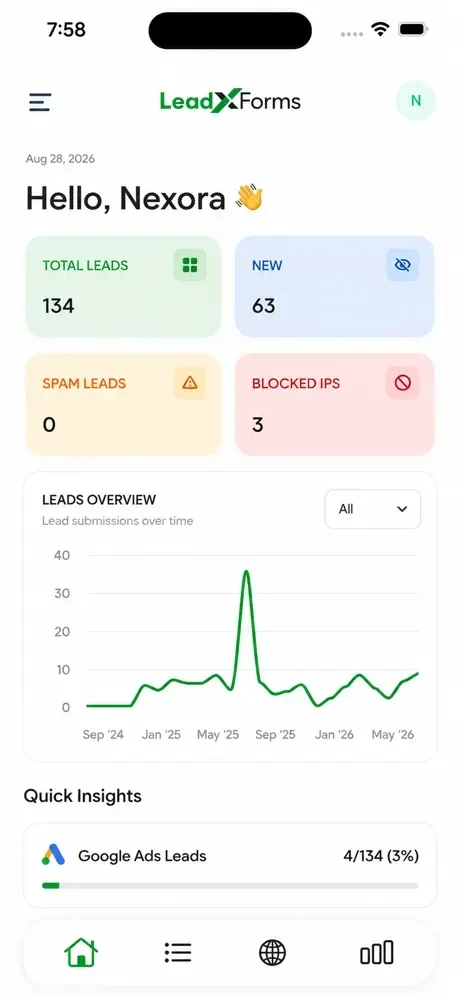
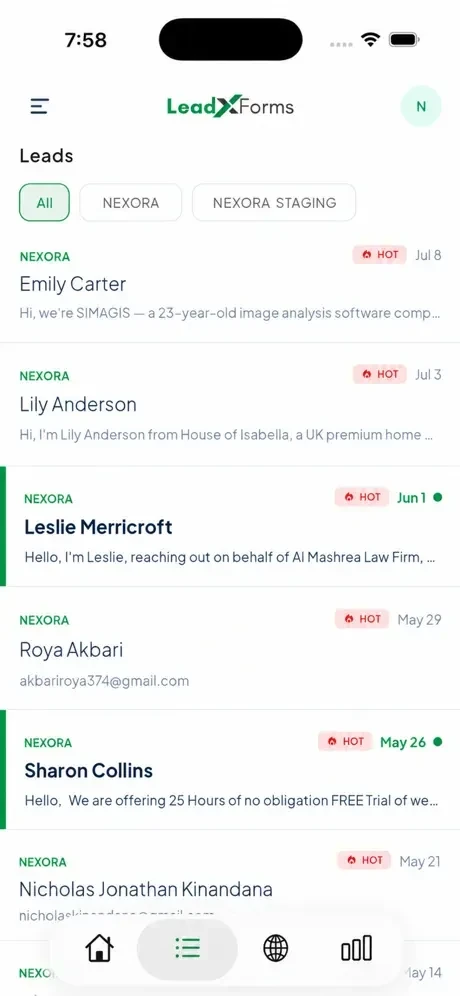
LeadXForms is also a mobile app, on iOS and Android. It sends a notification the moment a lead arrives, so a business owner never finds out late. The whole system is built to work on a phone too.
WHAT CLIENTS SAID
From a messy inbox to a short list.
Client answers, shared with permission. Tap a business.
Garnet Electrical
Electrical services · garnetelectrical.com.au
Before LeadXForms“Most of the day we're out working on jobs, so website enquiries would sit in our email until someone had time to check. By then, a potential customer might have already found another electrician.”
After“The notifications are probably the most useful part for us. We know when a new enquiry comes through, and the lead scoring helps us decide which ones to call back first.”
What I'd like next“I'd like to adjust the scoring myself, especially for urgent electrical work.”
Jaycar Electronics
Electronics and retail · jaycar.com.au
Before LeadXForms“We were getting different types of enquiries through our website, from product questions to more specific requests. Everything came through together, so it wasn't always easy to work out which ones needed attention first.”
After“Having enquiries organised in one place makes it easier to see what needs following up. The lead scoring also helps us identify which enquiries might be worth prioritising.”
What I'd like next“It would be useful to have more control over how enquiries are categorised based on different product types.”
Melton Foot Clinic
Podiatry and healthcare · meltonfootclinic.com.au
Before LeadXForms“Appointment enquiries were coming through our website, but during busy clinic hours we couldn't always respond straight away. Sometimes it was difficult to keep track of who we'd contacted and who was still waiting.”
After“We can now see incoming enquiries in one place and keep track of which ones we've followed up. It's made managing appointment requests a lot more straightforward.”
What I'd like next“I'd like to see how many enquiries actually turn into confirmed appointments.”
EduTraining Australia
Education and training · edutrainingaustralia.com.au
Before LeadXForms“We were receiving enquiries from people interested in different courses. Some were ready to enrol, while others were just looking for information, and sorting through them manually took time.”
After“The lead scoring helps us identify which enquiries to follow up first. We can also see why a lead received a particular score, which makes it easier to decide where to focus our time.”
What I'd like next“It would be helpful to adjust the scoring based on the course someone is interested in.”
BKH Maintenance Group
Property and building maintenance · bkhmaintenancegroup.com.au
Before LeadXForms“We were getting maintenance enquiries for all sorts of jobs. Some were urgent, others were general requests, and checking every submission individually was taking up time.”
After“Now we can see the higher-priority enquiries first and get notified when a new lead comes through. It's easier to follow up on potential jobs without having to constantly check emails.”
What I'd like next“I'd like to set different scoring rules depending on the type of maintenance work.”
Stratum Civil
Civil construction and infrastructure · stratumcivil.com.au
Before LeadXForms“We were getting project enquiries with different requirements and budgets. Some were genuine opportunities, while others weren't really suited to the work we do. We had to review each one to work that out.”
After“Lead scoring gives us a better idea of which enquiries are worth looking into first. Being able to see the reasoning behind the score is useful because we can make our own judgement before following up.”
What I'd like next“I'd like to customise the scoring based on project size, location and the type of work involved.”
All Water Resources
Water management and services · allwaterresources.com.au
Before LeadXForms“We were receiving enquiries for different types of water-related work, but some didn't include enough information to understand what the customer needed. We spent quite a bit of time going back and forth before knowing whether a job was suitable.”
After“Having the enquiry details together makes it easier to review potential jobs. We can also see which leads have been prioritised instead of treating every enquiry the same.”
What I'd like next“I'd like to be able to build more detailed forms for different services without needing technical help.”
Bravo EHVAC
Heating, ventilation and air conditioning · bravoehvac.com.au
Before LeadXForms“We were getting enquiries for installations, repairs and servicing, all through the same website form. During busy periods, it was easy to lose track of which customers we'd responded to.”
After“Now we can see our enquiries in one place and keep track of what's been dealt with. The scoring also helps us pick out the leads that might need a quicker response.”
What I'd like next“It would be good to have different scoring settings for installations and repair enquiries.”
Rageism Beauty
Beauty and cosmetics · rageismbeauty.com.au
Before LeadXForms“We were receiving different enquiries through our website, from product questions to potential business opportunities. They were all mixed together, which made it harder to keep track of the important ones.”
After“We can now see our enquiries in one place and identify which ones need following up. It's particularly helpful being able to separate genuine enquiries from spam.”
What I'd like next“I'd love to create different forms for customer enquiries and business enquiries without having to ask someone to set them up.”
Marine Mechanics
Marine engine repairs and maintenance · marinemechanics.com.au
Before LeadXForms“We'd get enquiries about engine repairs and servicing while we were out working on boats. Sometimes we wouldn't see them until later in the day, and by then the customer might have already contacted someone else.”
After“Getting a notification when someone submits an enquiry is really useful. We can also see which leads have a higher score, so we know who to get back to first.”
What I'd like next“I'd like customers to be able to provide more details about their boat and engine through the form.”
What they asked for next (of the 10 shown): 5 of 10 asked to adjust the score for their own kind of work (EduTraining, BKH, Stratum, Garnet, Bravo). 3 of 10 wanted to build more flexible forms on their own (All Water, Rageism, Marine). 1 of 10 wanted more control over categories by type (Jaycar). 1 of 10 wanted to see how many enquiries turn into customers (Melton).
WHAT I CAN SHOW
Small, honest numbers.
Team timed test
~60%
less time to build a form with the AI generator
Our team timed 5 forms on 15 Oct 2026: about 25 minutes each by hand in WordPress, about 10 minutes each with the LeadX AI generator.
Early traction
10
outside companies in 28 days
Built for Pixelz360's own clients first. After going to market, 10 other companies signed up in 28 days, with no ads (Sep 2026).
Product database
62
forms built since tracking began
22 of them (35%) used the AI generator, counting customer use and our own developers' testing. Tracking began on 13 Nov 2025, so earlier forms are not counted.
Product database
3,250
leads scored
Every lead gets a score. Counted from 13 Nov 2025 to 18 Oct 2026.
Product database
285
leads marked Won
Leads a business marked as won, in the same period.
Product database
1,150
spam and bot submissions auto-blocked
Blocked before they reached a lead list. A further 410 leads were marked as spam.
Some of the businesses using LeadX
- Fortisight
- Tradies You Can Trust
- MashCare
- Milling Paintings
- Darling Downs Skip Bin Hire
- McCloy Corner
- Watson Commercial
- Jaycar
- Melton Foot Clinic
- Edu Training Australia
- BKH Maintenance Group
- Stratum Civil
- All Water Resources
- Garnet Electrical
- Bravo EHVAC
- Mellings
- Rageism Beauty
- Marine Mechanics
Behind the work
What I wanted to show you
A product earns trust when it explains itself and lets a person overrule it.
What I learned
I design the moment something goes wrong first. The explanation, the override and the failure screen are where people decide whether to trust a product.