LeadScope: Automated Local Business Lead Discovery and Outreach System
A self-hosted n8n system that discovers local businesses, scores their sales potential, organizes them by niche and region, and saves qualified leads into a live Google Sheets outreach database.
Industry
Sales Technology / Lead Generation Automation
Category
Workflow Automation, Sales Operations, CRM and Business Intelligence
Built with
n8n, Docker, OpenStreetMap and Nominatim, Google Sheets, Google OAuth 2.0, JavaScript
Markets
United Kingdom, Ireland and Pakistan
Coverage
20 targeted business niches, one master database, one search-planning sheet
Project overview
I built a self-hosted lead-generation system using n8n, Docker, OpenStreetMap, and Google Sheets.
The system searches for local businesses, scores them based on sales potential, separates qualified and low-priority leads, and saves each business into both a master database and its relevant niche sheet.
It currently supports:
- 20 targeted business niches
- UK searches
- English-speaking European markets, starting with Ireland
- Pakistan searches
- A separate Pakistan high-value leads database
- Contact and outreach-status tracking
The problem
Finding local businesses manually takes time, and the results usually end up scattered across different spreadsheets.
I wanted one system where I could:
- Search by business type and location
- Identify businesses that may need a website or another service
- Prioritize the strongest opportunities
- Keep all leads in one master database
- Separate leads by niche and region
- Track contact progress without creating another CRM
How the system works
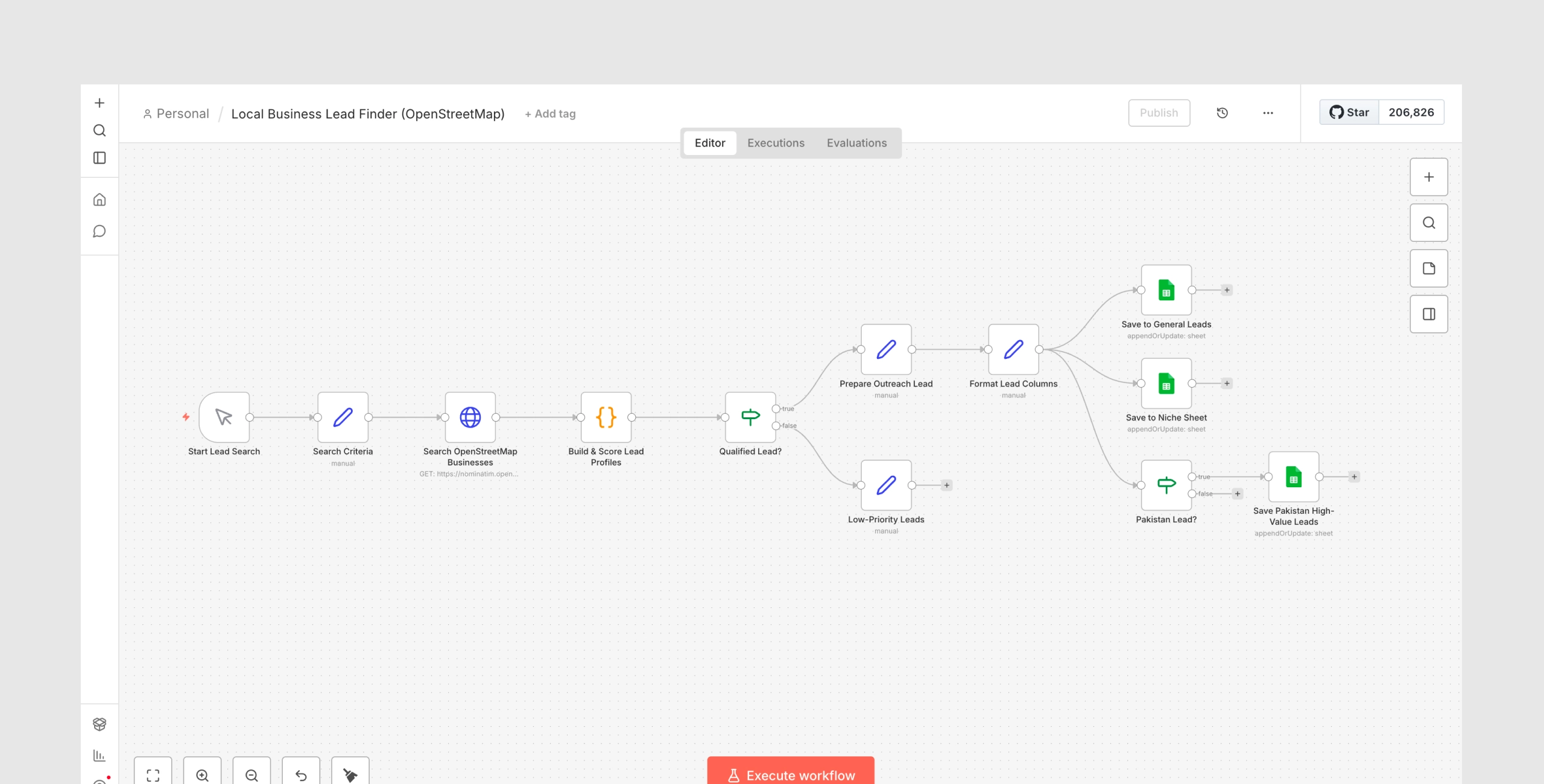
The workflow follows this process:
Manual search settings → OpenStreetMap search → Data cleanup → Lead scoring → Qualification → Niche routing → Regional routing → Google Sheets
- A search is started manually in n8n.
- The city, country, business type, niche, and destination sheet are selected.
- The workflow searches OpenStreetMap for matching businesses.
- Each result is converted into a structured lead profile.
- The workflow checks whether the business has a website, phone number, email, and other useful information.
- A lead score and priority are assigned.
- Qualified leads are added to the master `General Leads` sheet.
- The same lead is added to its relevant niche sheet.
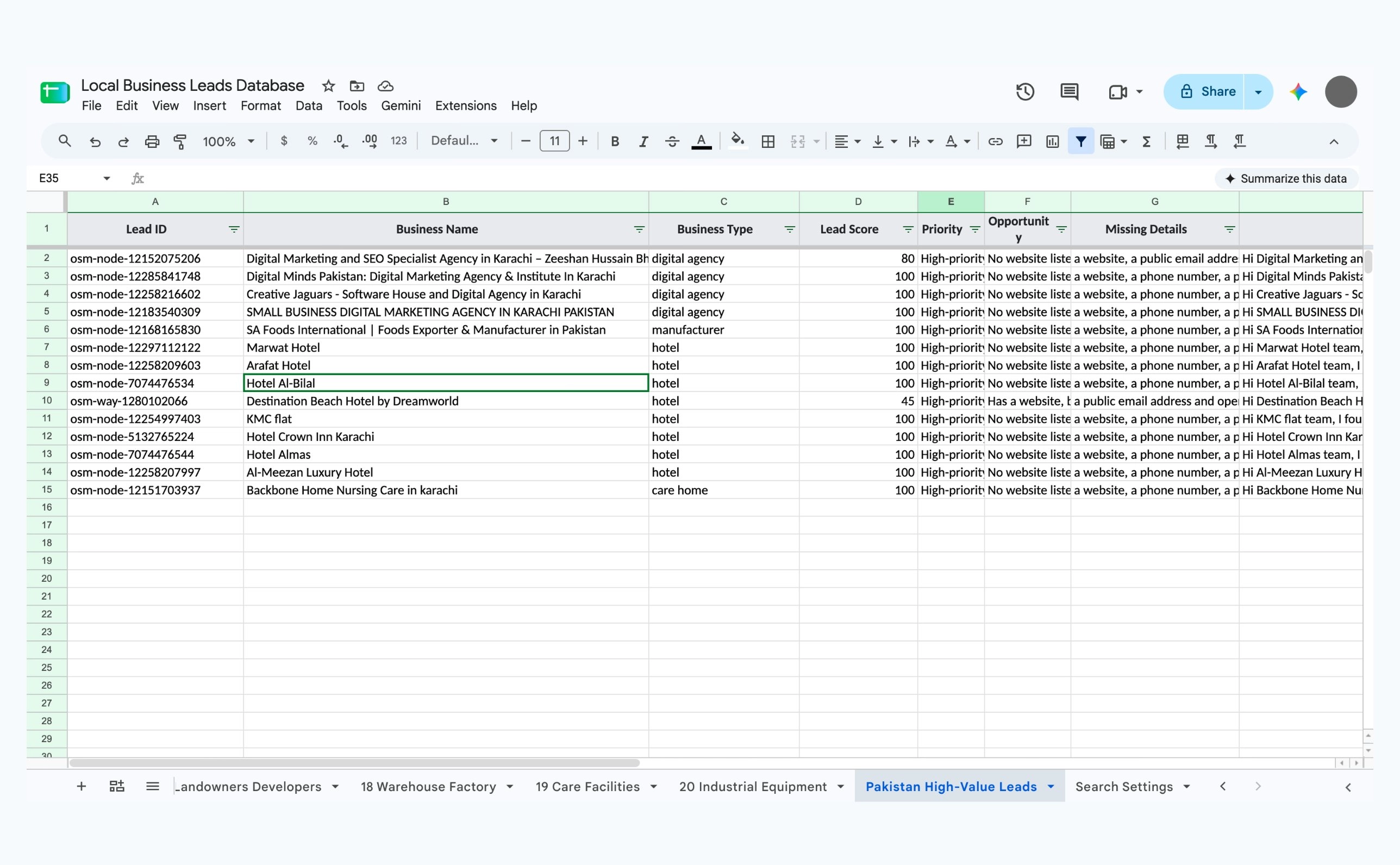
- Pakistan-based businesses are also copied to `Pakistan High-Value Leads`.
- Existing Lead IDs are updated instead of creating duplicate records.
Lead information collected
Each lead can include:
- Business name
- Business type
- Lead score
- Priority
- Opportunity identified
- Missing business information
- Suggested outreach pitch
- Website
- Phone number
- WhatsApp number
- Contact person
- Full address
- City
- Country
- Map link
- Region
- Niche
- Date found
- Outreach status
- Last contacted date
- Notes
Phone numbers, emails, WhatsApp numbers, and websites are only added when the business has publicly listed them in the source data.
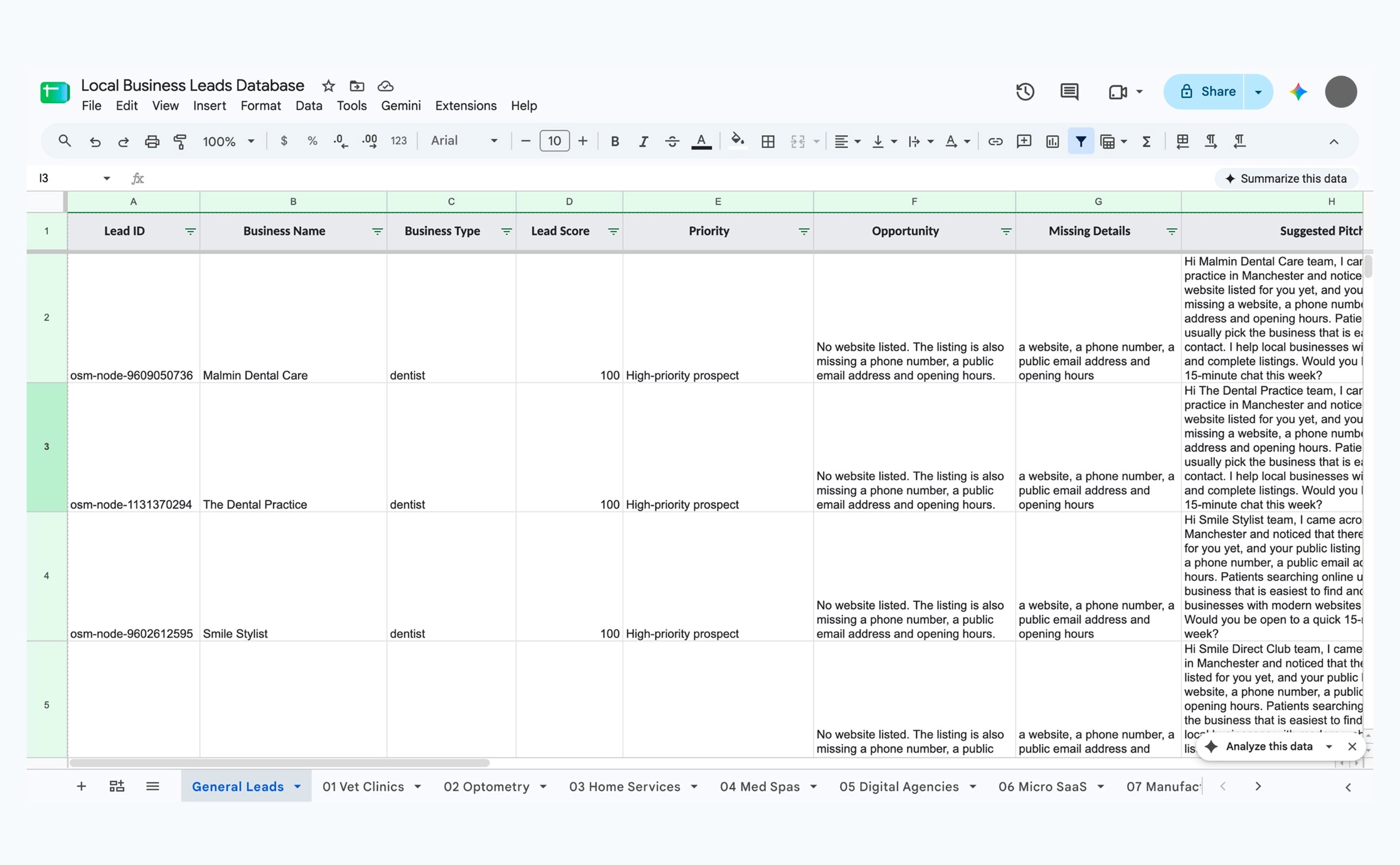
Lead scoring
Businesses receive a higher score when useful information is missing, particularly when no website is listed.
The score helps separate:
- High-priority prospects
- Businesses that may need a website
- Businesses with useful contact information
- Lower-priority or incomplete results
The minimum score can be changed for each search.
Supported niches
The database contains separate sheets for:
- Veterinary clinics
- Optometry practices
- HVAC, plumbing, and electrical businesses
- Med spas
- Digital agencies
- Micro-SaaS companies
- Small manufacturers
- Franchises
- Defense contractors
- Engineering and manufacturing firms
- Hotels and apartment owners
- Property managers
- Specialty food and beverage brands
- Food manufacturers
- DTC and CPG brands
- Medical-device startups
- Landowners and developers
- Warehouse and factory owners
- Care facilities
- Industrial-equipment businesses
These sheets are prepared for the full system. Initial data has already been added to several niches, while the remaining sheets will populate when their searches are run.
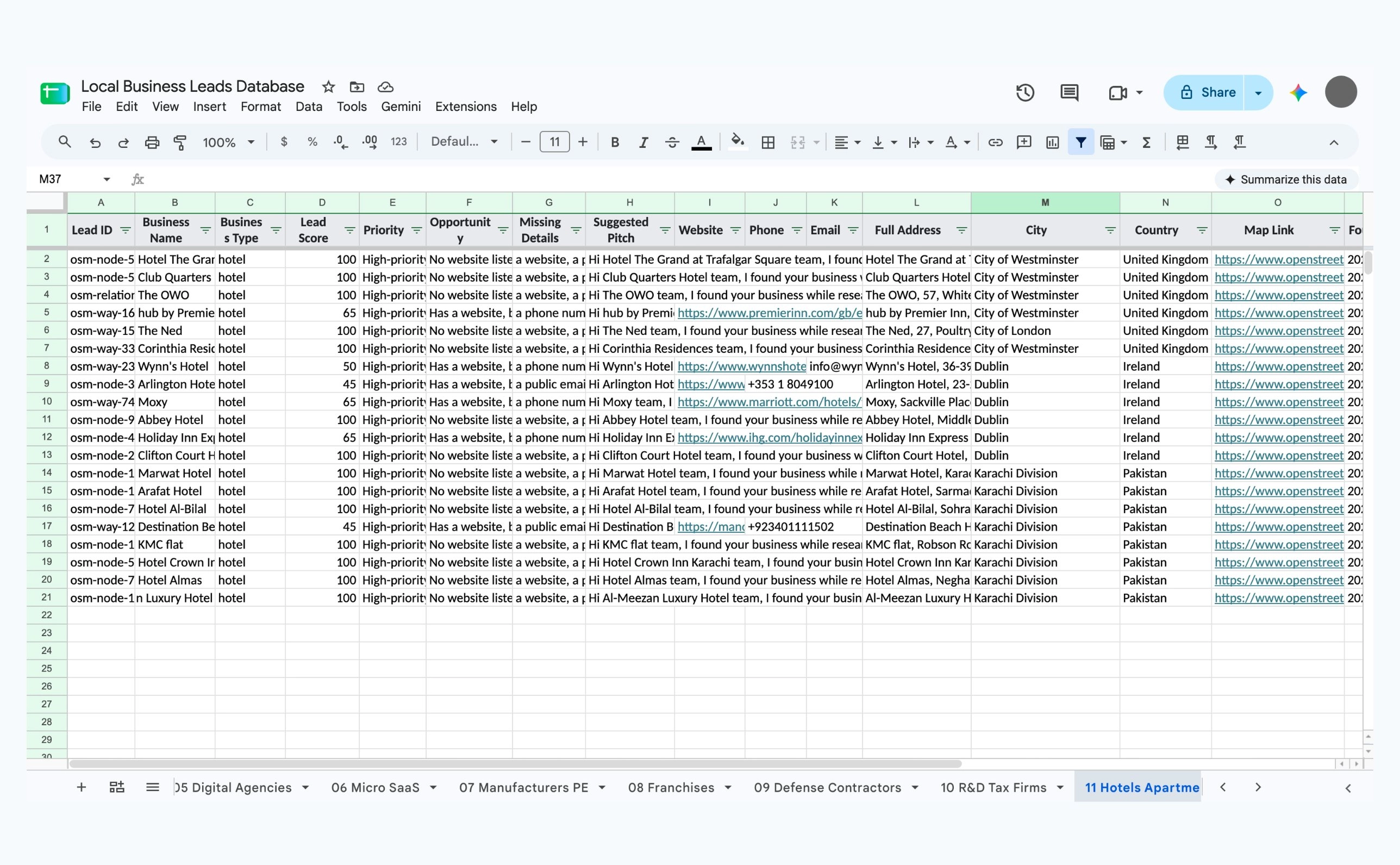
Database structure
General Leads. The master database contains every qualified business, regardless of niche or country.
Niche sheets. Every lead is also routed into its relevant business category. This makes it possible to work on a particular offer without filtering the complete database every time.
Pakistan High-Value Leads. This is an additional regional view for potentially valuable businesses in Pakistan. These leads still appear in `General Leads` and their niche sheet.
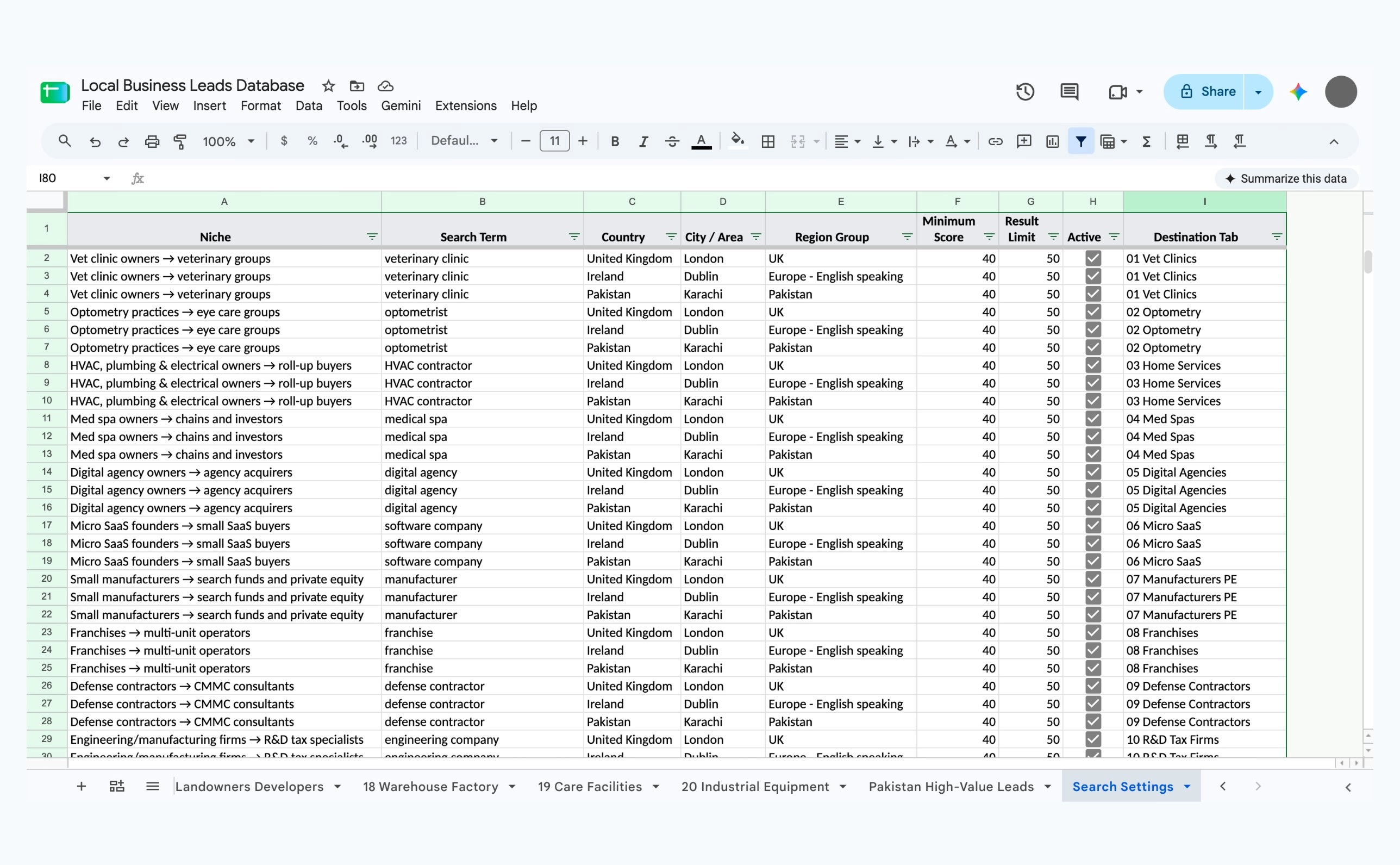
Search Settings. This sheet contains prepared search combinations for all 20 niches across:
- London, United Kingdom
- Dublin, Ireland
- Karachi, Pakistan
It also records the search term, minimum score, result limit, active status, region, and destination sheet.
1 / 2
Changing the country, city, or business
For the current live workflow:
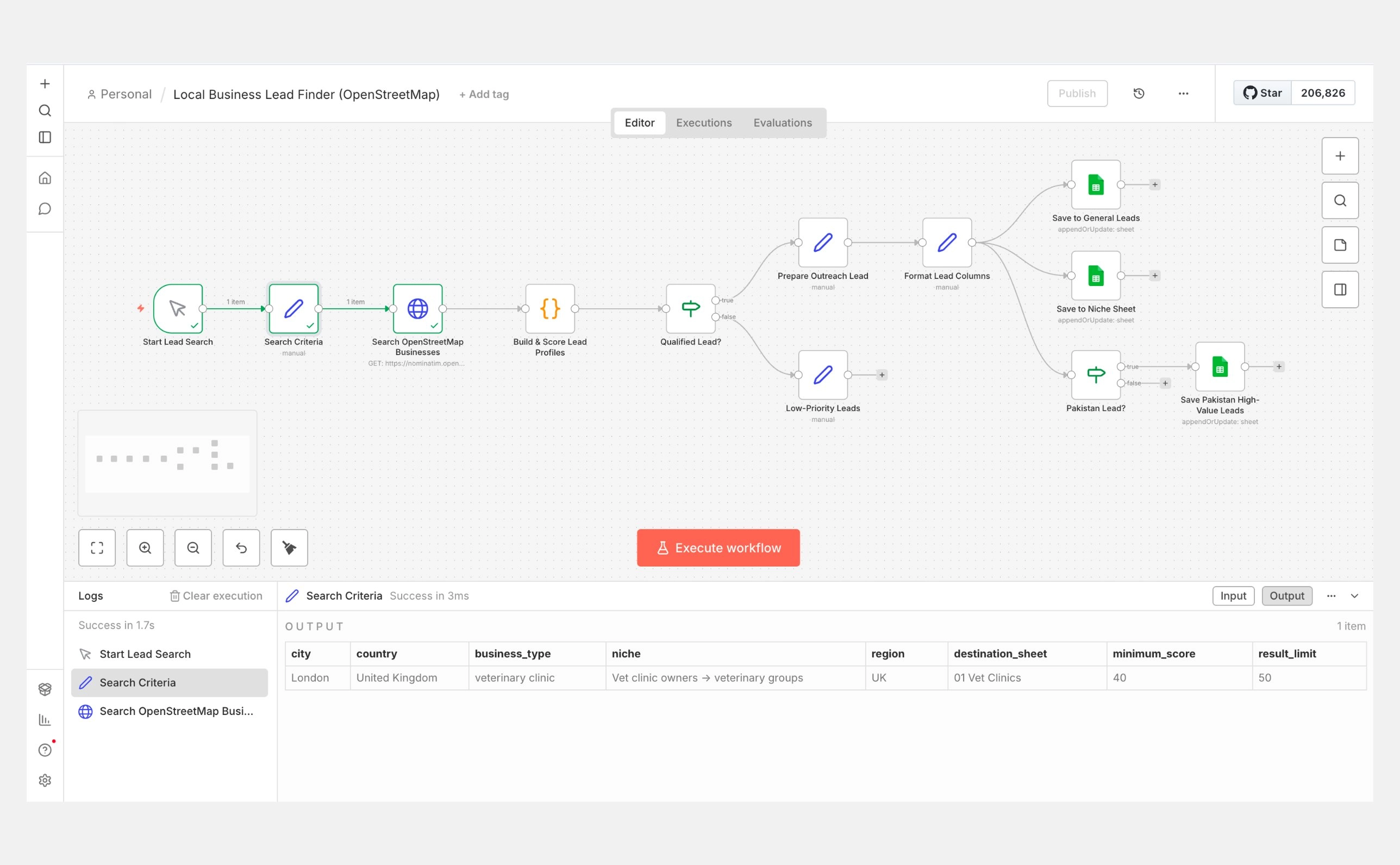
- Open the n8n workflow.
- Open the `Search Criteria` node.
- Change the required fields (listed below).
- Save the node.
- Click `Execute workflow`.
The fields in the `Search Criteria` node:
- `city`: London, Manchester, Dublin, Karachi, Lahore, etc.
- `country`: United Kingdom, Ireland, Pakistan, etc.
- `business_type`: hotel, dentist, veterinarian, digital agency, manufacturer, etc.
- `niche`: the commercial category being targeted.
- `region`: UK, Europe, or Pakistan.
- `destination_sheet`: must exactly match the required Google Sheets tab.
- `minimum_score`: determines which leads qualify.
- `result_limit`: maximum number of results requested.
The same workflow can therefore be reused for different markets without rebuilding it.
The `Search Settings` sheet works as the search-planning matrix. The current workflow uses the values inside the n8n `Search Criteria` node for each live run. Reading every active row from `Search Settings` automatically would be the next bulk-search upgrade.
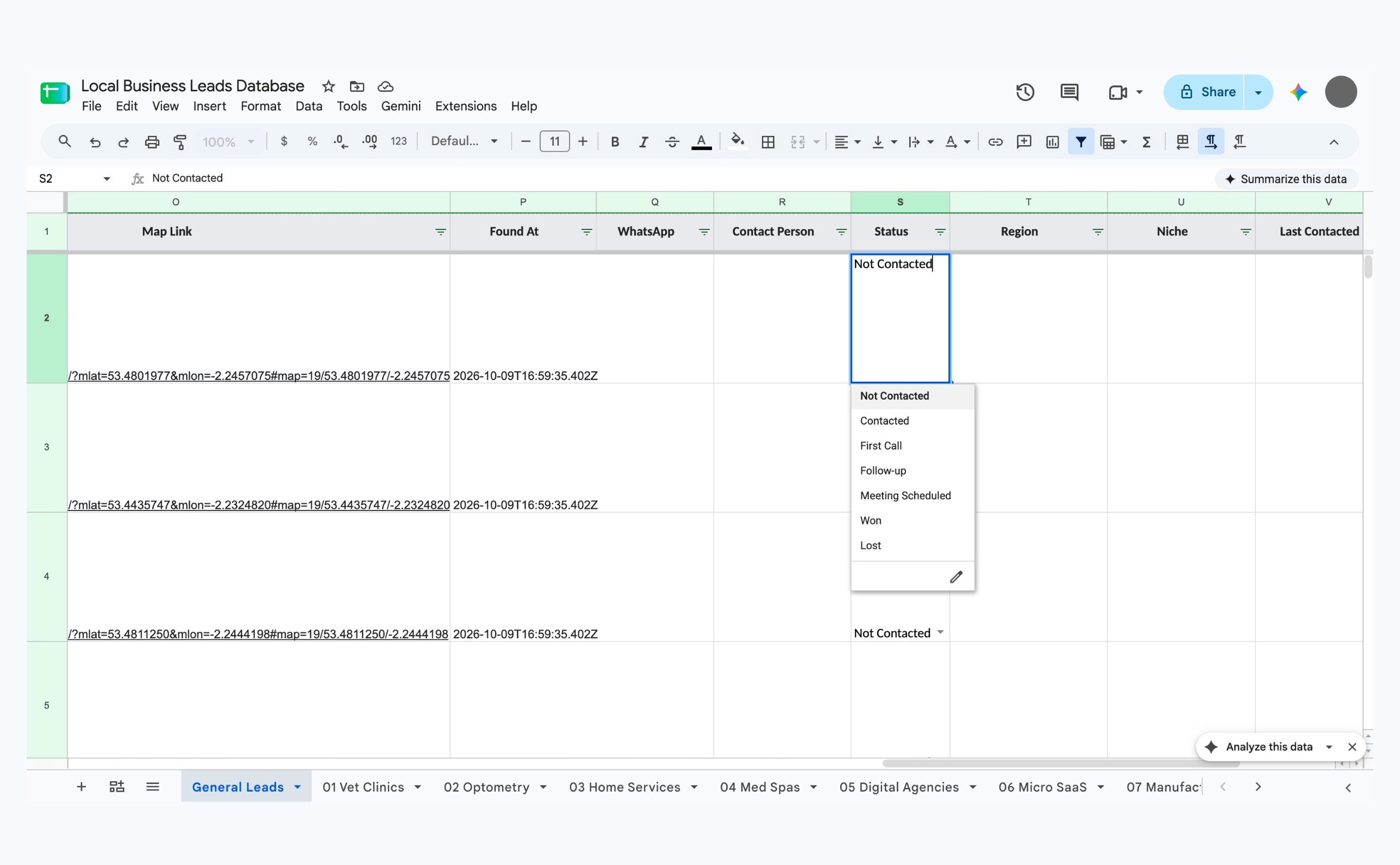
Outreach tracking
Each lead includes a status field with these options:
- Not Contacted
- Contacted
- First Call
- Follow-up
- Meeting Scheduled
- Won
- Lost
This allows the spreadsheet to work as a lightweight outreach CRM.
Current results
The current database contains:
- 74 leads in the master database
- 30 newly seeded businesses across the UK, Ireland, and Pakistan
- 9 UK businesses
- 7 Ireland businesses
- 14 Pakistan businesses
- 14 businesses in the Pakistan high-value segment
- Around 60 businesses without a listed website
- 20 niche-specific sheets
- One consolidated master database
- One editable search-planning sheet
The workflow can request up to 50 businesses per run. The actual number saved depends on available OpenStreetMap data, the qualification score, and duplicate detection.
Tools used
- n8n for workflow automation
- Docker for running n8n locally without an n8n subscription
- OpenStreetMap and Nominatim for business discovery
- Google Sheets for the live database
- Google OAuth 2.0 for secure access to the spreadsheet
- JavaScript inside n8n for cleaning, scoring, and formatting leads
Important limitations
OpenStreetMap is free, but many businesses do not publish their email, phone number, WhatsApp number, owner name, or website there.
The system does not invent missing contact information. For more complete contact data, a future version could add Google Places, company websites, Hunter, Apollo, or another enrichment service.
Search results also depend on the exact search wording. A search for `hotel` may produce more results than a very specific phrase such as `hotel owner looking for EV charging`.
Future improvements
- Run every active row from `Search Settings` automatically
- Add scheduled daily or weekly searches
- Search several cities in one execution
- Enrich missing email and decision-maker information
- Send personalized outreach automatically
- Add follow-up reminders
- Create a dashboard showing leads by country, niche, priority, and status
- Measure meetings, wins, losses, and conversion rates